
Creating and Managing Metadata for Datastreams
Datastreams represent time series of observations measured at or created at a monitoring site. You must first create the metadata for a datastream before loading observation values into that datastream.
Creating a Datastream
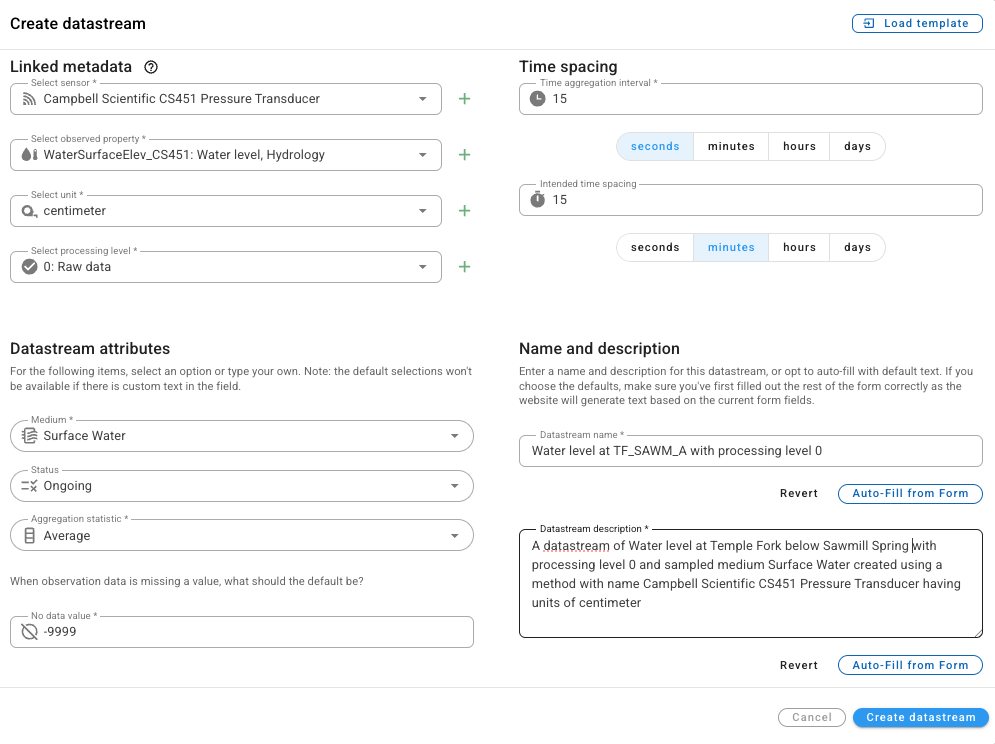
Creating and managing datastreams is done on the landing page for a monitoring site. To create a new datastream, click on the 'Add new datastream' button at the top right of the datastreams table. This will launch the 'Create datastream' window.
In this form, you can create the basic metadata for a datastream. The following are included:
- Sensor: The sensor or method used to create the observations.
- Observed Property: The quantity or parameter that was observed.
- Unit: The unit of measure for the observed values.
- Processing Level: The degree of processing the observation values have undergone.
- Medium: The environmental medium in which the observations were made.
- Status: The current status of the datastream.
- Aggregation Statistic: The specific statistic recorded.
- Nodata value: The value used for missing data.
- Time aggregation interval: The temporal footprint over which each observation was made (observation support)
- Intended time spacing: The intended spacing of the observations.
- Datastream name: A brief text name for the datastream.
- Datastream Description: A longer text description for the datastream.
Some attributes of a datastream are simple selections on the form and others are linked metadata objects describing the sensor, observed property, unit, and processing level. Linked metadata can be selected from a drop down list if they exist already, or they can be created by clicking on the green '+' next to the metadata element.
For the Datastream name and Datastream description attributes, you can use the 'Auto-Fill from Form' button to automatically generate a name and description, or you can enter your own text.
With the minimum datastream metadata set, you can click the 'Create datastream' button to save the datastream.
NOTE: Some of the metadata elements on the 'Create datastream' form (e.g., Medium, Status, and Aggregation Statistic) are controlled vocabulary lists. These controlled vocabularies can be modified by a HydroServer Administrator if needed.
Once the datastream is created, it will be displayed in the list of datastreams on the site landing page. It is now ready for loading data.
Creating Linked Metadata for a Datastream
When an item does not exist in the dropdown list for sensor, observed property, unit, or processing level, it must be created before it can be used. This can be done by clicking on the green '+' next to those attributes. Each one has a metadata entry form that will pop up. For example, the following is shown when creating a new Sensor:
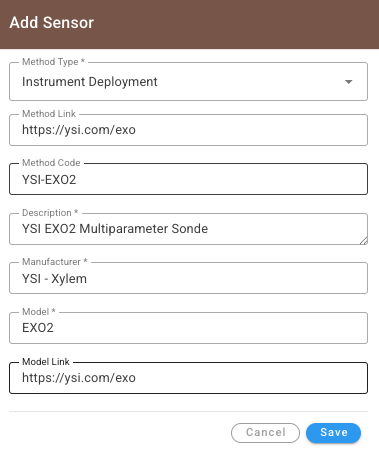
It's helpful to consult the HydroServer data model and data dictionary documentation for help in better understanding the required and optional metadata for sensors, observed properties, units, and processing levels.
NOTE: Linked metadata can also be created via the Data Management --> Metadata management page in HydroServer. On the 'Manage metadata' page, you can set up all of your sensors, observed properties, processing levels, and units before creating datastreams to make it easer and to enable choosing existing linked metadata from the drop down lists.
NOTE: All metadata in a HydroServer instance is created within a workspace. If you have multiple workspaces and you want to be able to use the same list of sensors, observed properties, processing levels, and units across multiple workspaces, a HydroServer administrator can set these up as 'System metadata' for use across workspaces.
Creating a Datastream from a Template
Because creating the metadata for a datastream can be a little tedious, we created a button to load a template for a datastream. If you have multiple monitoring sites with similar datastreams (e.g., multiple sites with the same installed sensors), you can choose a datastream from another site to serve as a template.
To use this functionality, click the 'Add new datastream' button on the site landing page, then select the 'Load template' button at the top right of the 'Create datastream' form. You will select a site and then you will see a list of existing datastreams you can choose from.
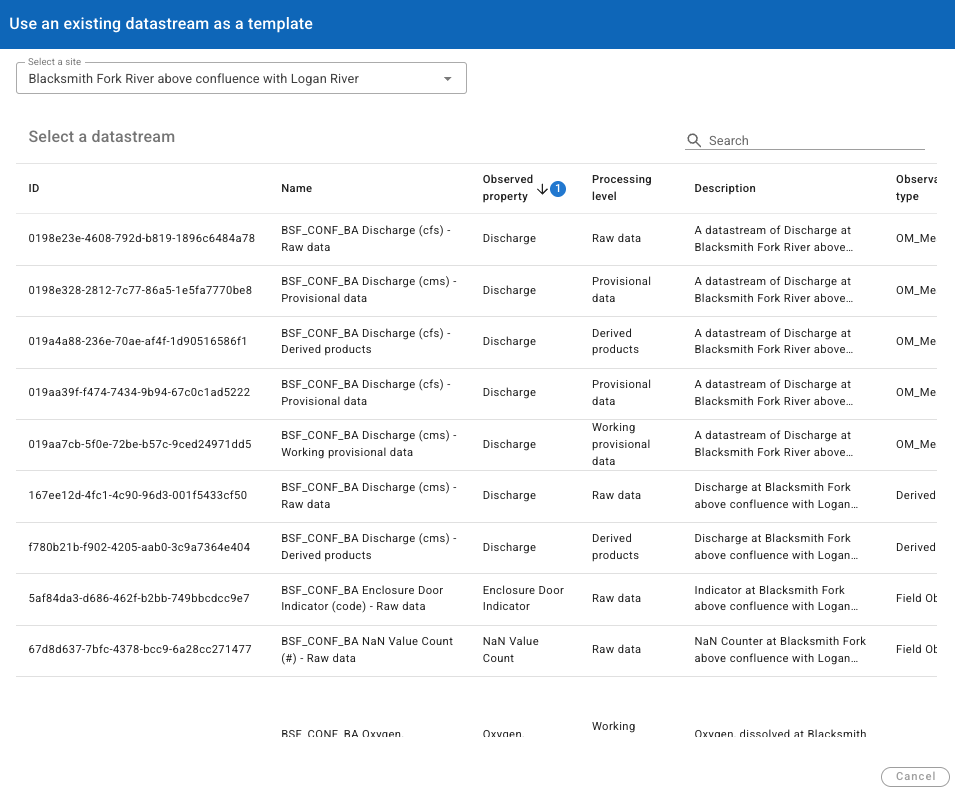
Choosing a template will copy all of the metadata elements for that datastream into the new datastream and then you can make any necessary edits like changing the name or the description.
Editing Datastream Metadata
Once a datastream is created, it can be edited by finding it in the list of datastreams on the site landing page, clicking on the Actions button (the three vertical dots) and selecting 'Edit datastream metadata'. This will launch the datastream's metadata into the same form you used to create the datastream and you can edit it there.
Deleting a Datastream
You can delete the observation values from a datastream by locating the datastream in the list at the bottom of the site landing page, clicking on the Action button (the three vertical dots) and selecting 'Delete data from datastream'. This is useful if you want to clear any data you have loaded into a datastream and start over with loading data.
You can delete an entire datastream by clicking on the Action button (the three vertical dots) and selecting 'Delete datastream'. This will open a dialog warning you that this action will delete the datastream and all associated observations for all users of HydroServer.
WARNING: Deleting the observation values from a datastream and deleting an entire datastream are permanent. If you delete a datastream, all of the data associated with that datastream will also be deleted.