
Getting Started with hydroserver.ts
This simple demo is for developers who want to build HydroServer-powered apps without hand-writing raw API calls.
We’ll use the hydroserver.ts API client to build a small browser app that will:
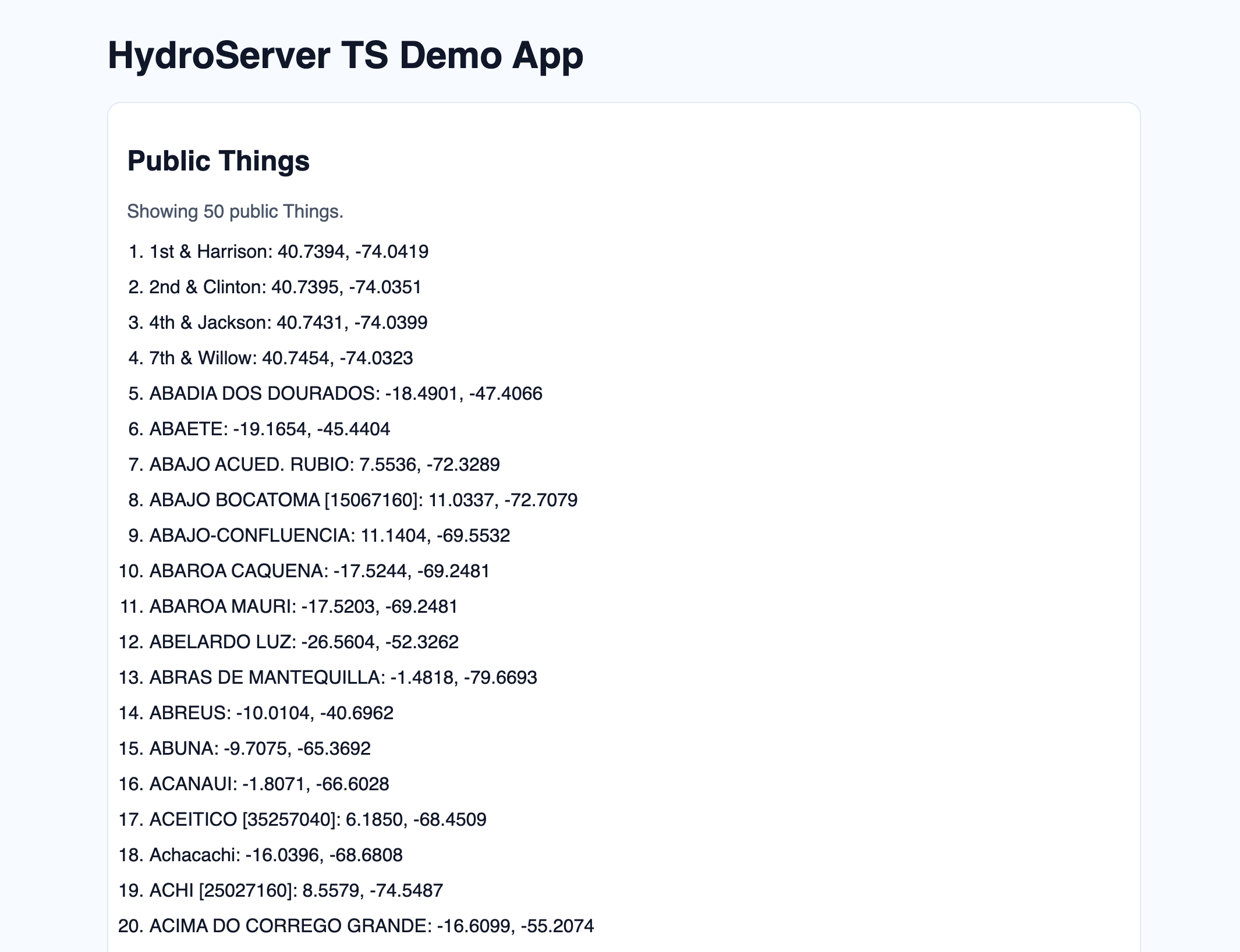
- Fetch a page of the first 50 public Things currently on playground.hydroserver.org
- Print each Thing with a location
The API client is written in TypeScript and gives you typed models and typed API methods end-to-end, but of course using the typing features is optional so vanilla JavaScript will work along side the client just fine, along with your choice of frontend framework.
Preview
Prerequisites
- Node.js 20+
- A HydroServer account (you can use
https://playground.hydroserver.org)
1. Create a new frontend project
We’ll use Vite with TypeScript to keep the example focused on the client and framework-agnostic.
npm create vite@latest hydroserver-ts-demo -- --template vanilla-ts
cd hydroserver-ts-demo
npm install
npm install @hydroserver/client
2. Add project files
When running locally, proxy HydroServer API routes through Vite so browser requests stay same-origin.
import { defineConfig } from "vite";

export default defineConfig({
  server: { proxy: { "/api": "https://playground.hydroserver.org" } },
});<!DOCTYPE html>
<html lang="en">
<head>
<meta charset="UTF-8" />
<meta name="viewport" content="width=device-width, initial-scale=1.0" />
<title>HydroServer TS Demo App</title>
</head>
<body>
<main class="app">
<h1>HydroServer TS Demo App</h1>
<section class="card">
<h2>Public Things</h2>
<p id="status" class="muted">Loading...</p>
<ol id="things-list" class="thing-list"></ol>
</section>
</main>
<script type="module" src="/src/main.ts"></script>
</body>
</html>import "./style.css";
import hs, { createHydroServer, type Thing } from "@hydroserver/client";
await createHydroServer({ host: "" });
const status = document.querySelector<HTMLParagraphElement>("#status")!;
const list = document.querySelector<HTMLOListElement>("#things-list")!;
const row = ({ name, location }: Thing) => {
const li = document.createElement("li");
const lat = Number(location.latitude).toFixed(4);
const lon = Number(location.longitude).toFixed(4);
li.textContent = `${name}: ${lat}, ${lon}`;
return li;
};
const res = await hs.things.list({
page: 1,
page_size: 50,
order_by: ["name"],
is_private: false,
});
const things: Thing[] = res.data;
list.replaceChildren(...things.map(row));
status.textContent = res.ok
? `Showing ${things.length} public Things.`
: res.message;:root {
font-family: "IBM Plex Sans", "Segoe UI", sans-serif;
color: #0f172a;
background: #f6fbff;
}
* {
box-sizing: border-box;
}
body {
margin: 0;
}
.app {
max-width: 920px;
margin: 2rem auto;
padding: 0 1rem;
}
.card {
background: #fff;
border: 1px solid #dbeafe;
border-radius: 12px;
padding: 1rem;
}
.muted {
color: #475569;
margin-top: 0;
}
.thing-list {
margin: 0;
padding-left: 1.2rem;
display: grid;
gap: 0.75rem;
}With this setup, the client uses host: "" so requests go through the local /api proxy.
What the API client is doing in this code
Startup and client wiring
await createHydroServer({ host: "" })initializes the client once. After that,hsis available throughout your app.One API call for Things
hs.things.list(...)retrieves page 1 withpage_size: 50, ordered by name, and limited to public Things.Rendering
The response data is mapped directly into<li>elements with Thing name and location text.Error handling style
Calls returningApiResponseshould checkresponse.okand displayresponse.messageon failure.
3. Run the app
npm run devOpen the local Vite URL (usually http://localhost:5173) and you should see the first 50 public Things with their locations.
Notes for production
- If your frontend is served by HydroServer itself, keep
host: ""and remove the dev proxy. - If your frontend and HydroServer are on different origins, configure CORS and CSRF/session cookie settings on the HydroServer deployment.
- If you prefer explicit API client instances (instead of the shared
hsexport), you can useHydroServer.initialize(...)and pass the instance through your app.
Next step
For more examples of how to use hydroserver.ts, head over the how-to guide: Manage Data With the TypeScript Client.